Homestead Chores Manager
Chores for the whole farm · iPhone, iPad and Mac
Who does what, and did it get done
A chore chart for the farm and the house, built on a working Georgia farm. Kids tick off their own jobs, a grown-up checks, and a farm sitter gets the same list while you’re away.
iPhone, iPad and Mac. Animals, garden and house. Big buttons and short words, so kids can use it on their own. “Chores” on your home screen.
Sound familiar?
“Did anybody water the pigs?”
Solved: every job shows who has it and whether it’s done, and who ticked it and when.
“I forgot.”
Solved: a reminder for each person’s own jobs at sunrise, before sunset, before dinner or a set time. The sun times move with the seasons.
“It’s not my turn!”
Solved: a job can belong to one person, to anyone, or take turns by day or by week. The app keeps track of whose turn it is.
“Did you really clean your room?”
Solved: a job can ask for a photo, an egg count or a grown-up’s check before it counts.
“What do we tell the farm sitter?”
Solved: a guide to your farm: who to call first, every valve and breaker and what it shuts off, the day at a glance and a page for each group of animals.
“Which days did I earn?”
Solved: an allowance for each day all done, a grown-up approves the day, and the kids send their month’s invoice from the app.
Up and running in an evening
Add your people
Grown-ups, kids, helpers and the farm sitter, each with a color. Give the kids a PIN if they share a phone or iPad.
Add your jobs
Farm and house. How often, what time of day, which months, and whose job it is. Two feedings a day are one job.
Tick them off
Everyone opens Today and taps a job when it’s done. The Week shows which days got all done.
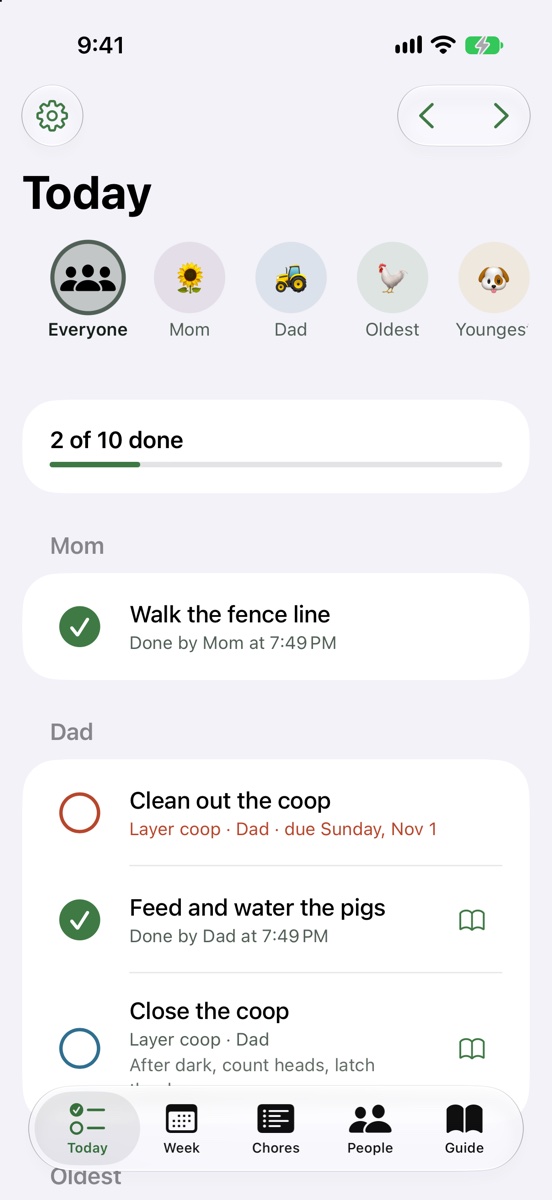
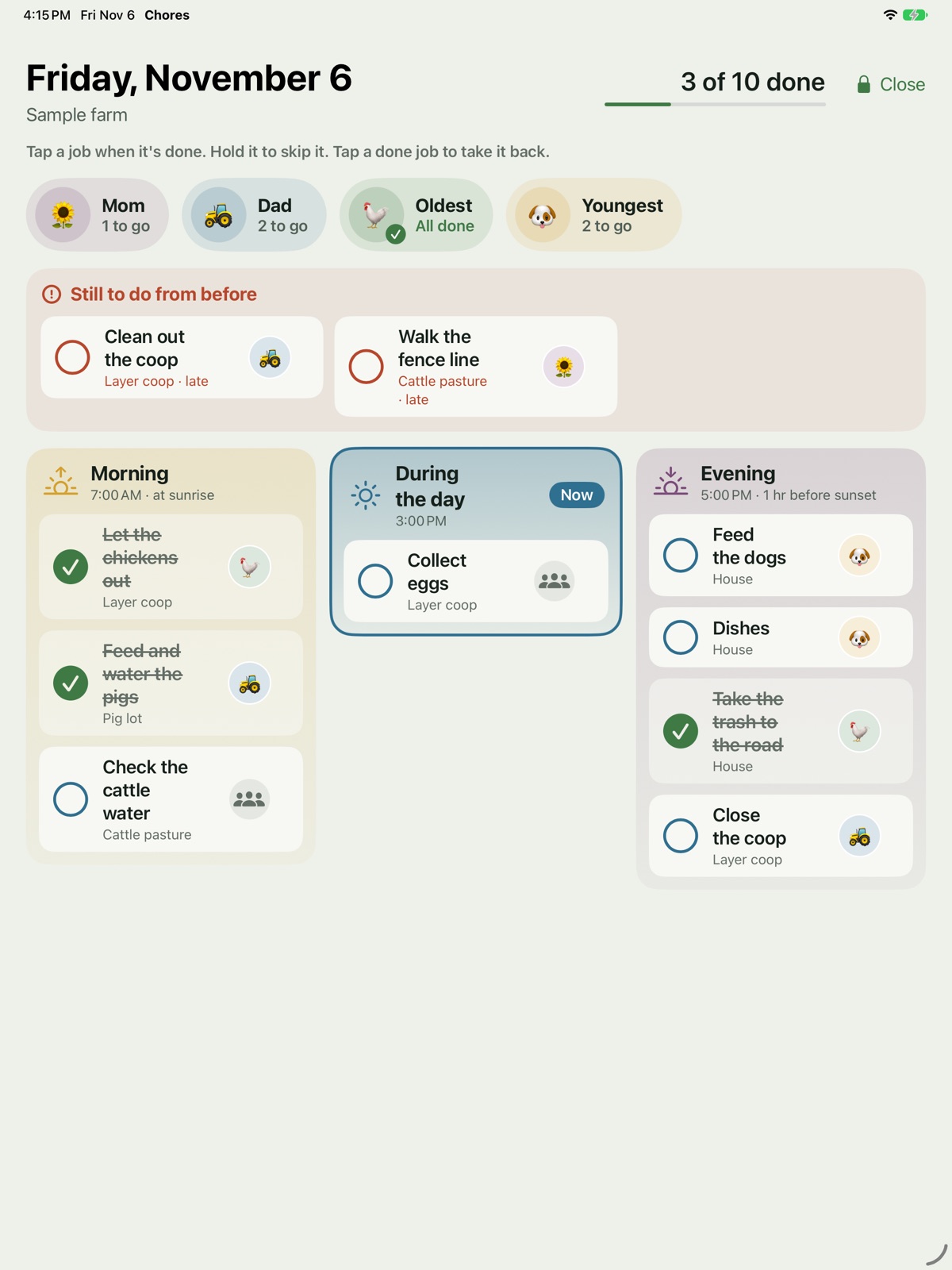
Today: everyone’s jobs, in the order of the day
Morning, during the day, evening and after dark. Each person sees their own list; a grown-up sees the whole farm, and what’s still open.
One phone for the kids
On a shared iPhone or the family iPad, each kid taps their name (and their PIN) and sees only their jobs. It locks again when they put it down.
Late, skipped or done
A missed job stays open, marked late, until it’s done or comes round again. Daily jobs start fresh each day. Skip a job with a reason: it rained, someone else did it, the animals moved.
Nothing gets lost
Taking back a tick is its own record, so the history always shows what happened and who did it.
The week at a glance
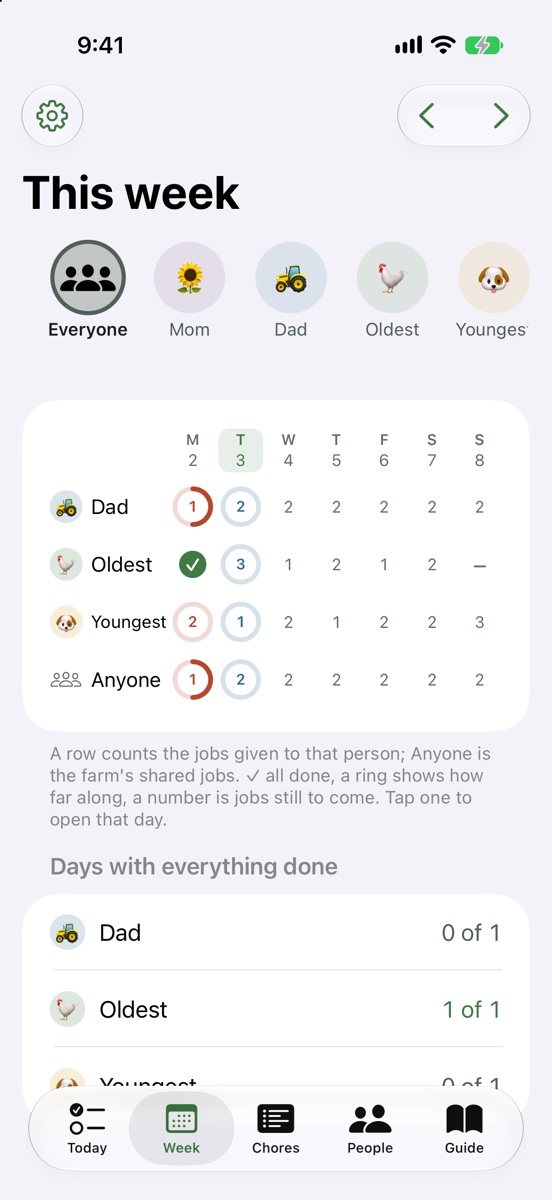
A row for each person and a column for each day: a tick when it’s all done, a ring with what’s left, and the jobs still coming.
- Daily, every few days, certain weekdays, monthly, once, or a few days after it was last done
- Seasonal jobs only in the months you pick
- Change a schedule and only the days to come change; past days stay as they were
- History for every job and every person, with notes and photos
- A “to check” list for grown-ups, for jobs that need a second look
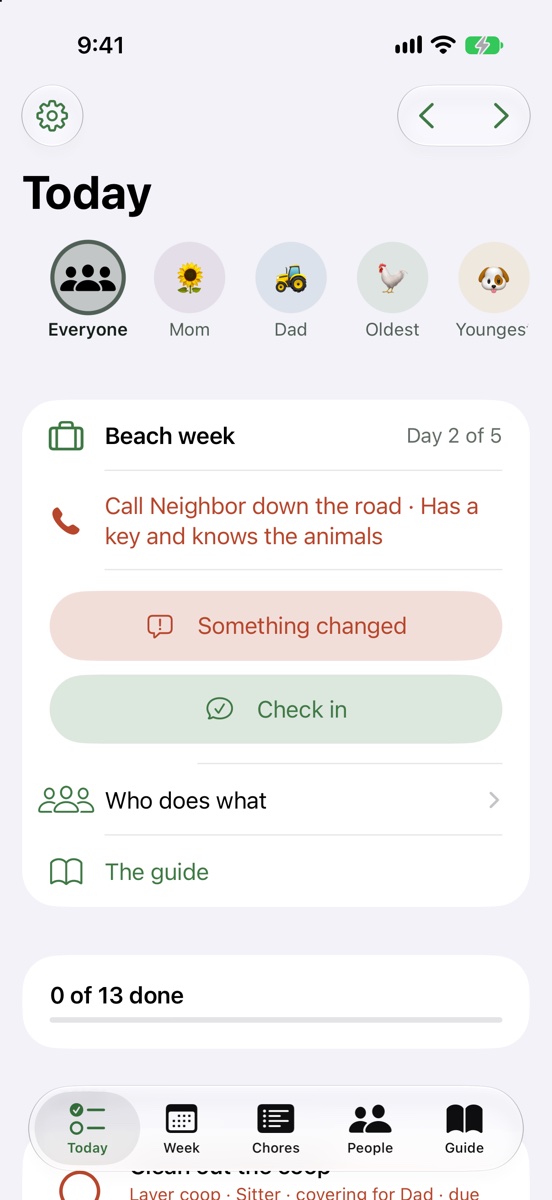
Going away? The sitter gets the same list
Plan a trip and the app hands your jobs to the people staying behind: the farm sitter, a neighbor, the kid who moves the cows.
- Every group of animals has someone checking its water every day, yours or ones you keep for a neighbor. The app tells you if any group has nobody
- “Something changed” reports from the farm: a valve closed, the water out, a fence down, an animal sick or loose, with a photo
- A printed checklist for each week of the trip, for a sitter without an iPhone
- A check before you leave: who has the water, who to call first, and what each valve shuts off
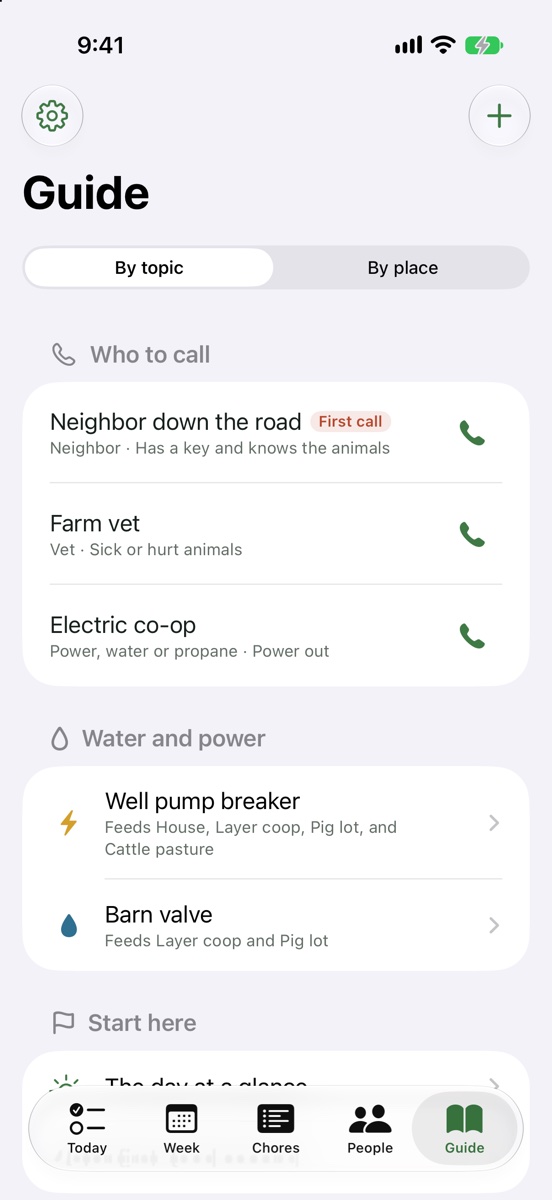
A guide to your farm, written once
Everything a sitter or a new helper needs to know, in one place, and on paper for the barn.
- Who to call first, with a button to call them
- Water and power: every valve and breaker, where it is, and which places it shuts off
- The day at a glance, made from your own chores
- A page for each group of animals and each part of the farm, with photos and a video link
- Each job links to its page, so the how-to is a tap away
- The whole guide as a PDF for the barn binder
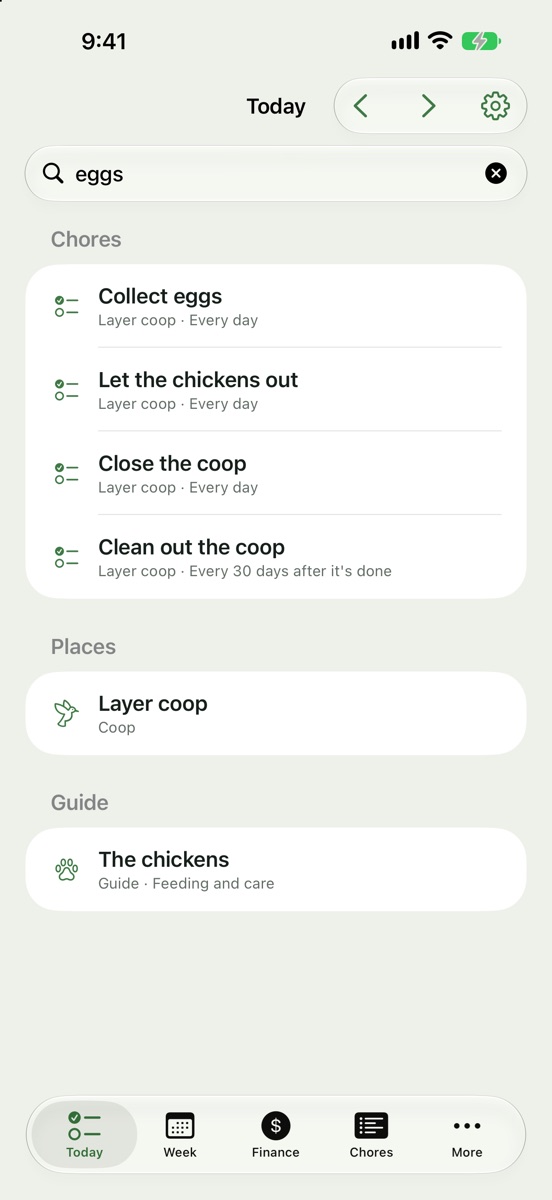
Find anything in a few letters
Pull down on Today and type. The app looks through everything on the farm and in the app, and a tap takes you straight there.
- Jobs, people, places and trips by name
- The guide: page titles and what’s written on them, every valve and breaker, and who to call
- What you want to do, in your own words: plan a trip, add a chore, reminders, print the guide
- Close enough is fine: a typo or the start of a word still finds it
- Kids see only what’s theirs to open
An allowance that keeps itself
Set what a day all done is worth for each kid. Paid extras sit outside the all-or-nothing day.
A grown-up approves the day
Approve it, or say no with a reason. A missed day can still be excused.
Extras for extra work
A job can pay extra on top, like stacking hay or washing the truck.
The kids send the invoice
At the end of the month they send theirs from the app. The grown-ups get a notification and mark it paid.
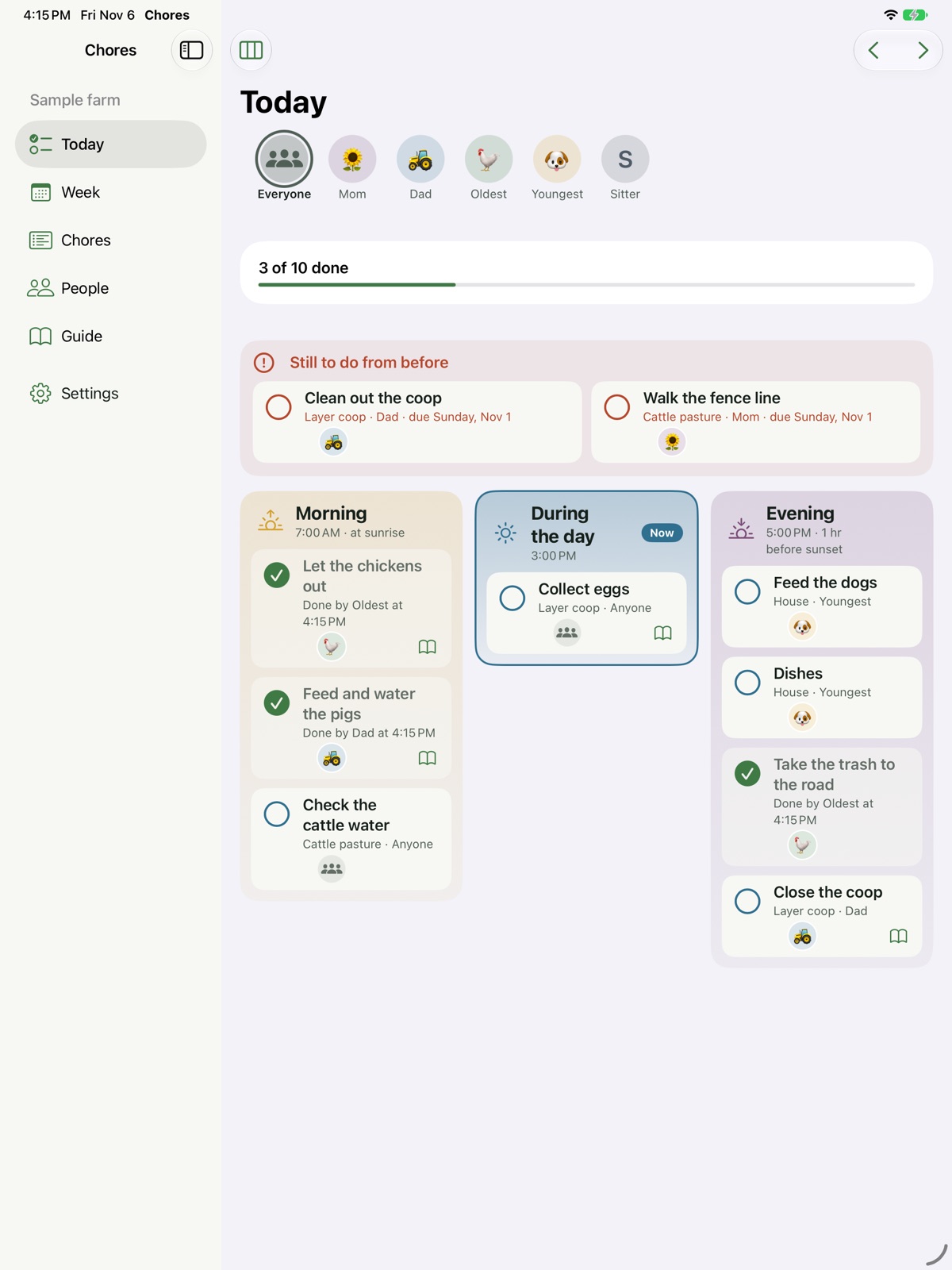
On the iPad, the Mac and the kitchen wall
A sidebar on the bigger screens, and the same farm on every device through your own iCloud. On the iPad, the day is laid out in columns from morning to after dark, with whoever has each job, or did it, beside it. The kitchen board puts all of it on an iPad on the wall, big, with everyone’s photo and what they have left; anyone taps a job when it’s done, and it takes a grown-up’s PIN to leave the board. There’s a widget for the home screen and the lock screen, and Siri can tick a job off or tell you what’s left.
Free for the chore chart. More for the family and the farm.
The chart itself is free, for good. Your records are never locked: everything you’ve recorded stays, and you can always export it.
Free
The family chore chart on one device
- People, jobs, Today and the Week
- Name tiles and PINs on one shared phone or iPad
- Reminders tied to sunrise, sunset or dinner
- The farm guide
- History, notes and photos
- Export to a spreadsheet
Family
Everything in Free, on every family device
- The allowance and the kids’ invoices
- The widget
- The kitchen board
- Siri
Farm
Everything in Family, for a farm with sitters and helpers
- Sitter mode: trips, water for every group, reports
- The printed guide and trip checklist
- Recording in Flock and Grazing (on the way)
- The Mac app
Family and Farm will be monthly or yearly subscriptions through the App Store. Prices will be set before launch; the beta is free and has everything.
Built on our own farm
I’m Mike Kummer. We keep pigs, cattle, ducks, turkeys, guineas and laying hens in Chattooga County, Georgia, with two kids who do a lot of the chores.
Last September we were away for two weeks. During fence work a water line was cut, and the valve closed to fix it also shut off a paddock of a neighbor’s sheep and goats. Nobody checked their water, and we lost animals that weren’t even ours. This app is what I wish we’d had: a named person for every group’s water, every day, a page that says what each valve shuts off, and a way to hear right away when something changes.
Questions
Is it only for farm chores?
No. House chores work the same way: the dishwasher, your room, the laundry, feeding the dog. Use it for the house, the farm or both.
Do the kids need their own phone?
No. On a shared iPhone or the family iPad, each kid taps their name and enters their PIN, and the app locks again when they put it down. A kid with their own iPad can have the farm on it too, opening straight to their list.
Can the farm sitter use it without an iPhone?
Yes. Print the trip’s checklist: a page for each week with every job, who has it and a box for each day, then the how-tos and the shut-offs.
Do I need internet in the barn?
No. Everything works offline and syncs through iCloud when you’re back in range.
How do I find everything it can do?
Tap the search box on Today before you type: it lists everything the app can do for your family and farm, grouped by job. Or see everything Chores can do. Now and then the end of Today also suggests a feature your own records say would help.
Where are my records kept?
On your iPhone, iPad or Mac and in your own iCloud account. We don’t keep a copy of your farm on our servers.
What if I get a new phone?
Sign in with the same Apple Account and iCloud brings your farm back. You can also make a backup file any time (Settings, Back up and restore) and open it on the new phone. The app keeps a daily copy on the phone too.
Can I get my records out?
Yes, any time and on every plan: Settings, Print and export makes an Excel workbook of every job, tick, person, trip and guide page. Your records are yours.
Does it work with Grazing and Flock?
They look and work alike, and each keeps its own records. Recording a done job in the app it belongs to, like the egg count in Flock or a cattle move in Grazing, is being built now.
What does it cost?
The chore chart is free. Family and Farm will be subscriptions; prices will be set before launch. The beta is free and has everything.
Is it on Android?
Not yet. It’s iPhone, iPad and Mac for now.
Try it free with your own family
I’m looking for families and farms of every size to test the beta and tell me what’s missing.
Questions or feedback: [email protected] · Privacy policy
Apple, iPhone, iPad, Mac, Siri and iCloud are trademarks of Apple Inc.